A DBMS architecture describes how a database system receives a query, plans it, executes it, and moves data between memory and disk.
If you are studying for an exam or trying to understand what happens after you write SQL, this is the mental model to keep:
- the client sends a query;
- the DBMS parses and validates it;
- the optimizer chooses an execution plan;
- the execution engine runs that plan;
- the storage layer reads and writes pages;
- the buffer pool tries to avoid expensive disk access.
This article connects well with Relational Data Modeling, Relational Normalization, and SQL Index Performance.
What is DBMS architecture?#
DBMS architecture is the internal organization of a Database Management System.
Its goal is to turn high-level requests such as:
SELECT *
FROM users
WHERE email = 'alice@example.com';
into low-level operations on memory pages, indexes, logs, and files.
High-level DBMS architecture diagram#
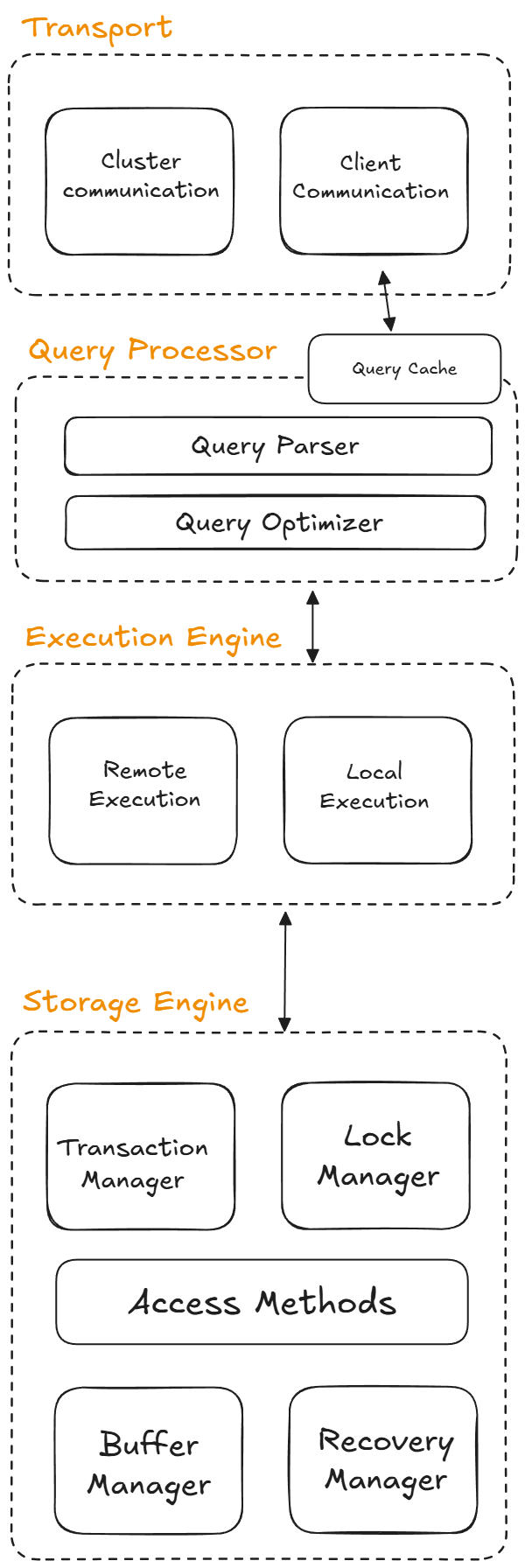
Even though engines differ, most of them include versions of the same major components.
1. Client and transport layer#
The first layer receives requests from the application, CLI, or another service.
Its responsibilities usually include:
- accepting connections;
- receiving SQL statements;
- handling sessions;
- managing communication between client and server.
In distributed systems, this layer may also route requests across nodes.
2. Parser and validator#
Before the DBMS can run a query, it must understand it.
The parser checks syntax. The validator checks whether the referenced tables, columns, functions, and permissions actually exist.
If you misspell a column name, the process often stops here.
3. Query processor and optimizer#
The query processor converts the SQL statement into an internal representation. The optimizer then decides the cheapest known way to execute it.
Typical optimizer choices include:
- whether to scan a table or use an index;
- join order;
- join algorithm;
- use of temporary structures;
- use of cached information or statistics.
This is why two SQL queries that look similar can run with very different performance.
4. Execution engine#
The execution engine runs the selected plan.
It coordinates operators such as:
- table scans;
- index lookups;
- filters;
- joins;
- sorts;
- aggregations.
If the optimizer says “use the index first, then fetch matching rows”, the execution engine is the component that actually performs that sequence.
5. Storage manager#
The storage manager is responsible for organizing how the database interacts with durable storage.
This area often includes:
- page management;
- file layout;
- free space tracking;
- access methods such as heaps and B-trees;
- metadata about tables and indexes.
Some diagrams call this component the storage engine or storage manager depending on the DBMS.
6. Buffer pool (buffer manager)#
Disk access is expensive compared with memory access, so DBMSs keep frequently used pages in RAM.
That cache is commonly called the buffer pool or buffer manager.
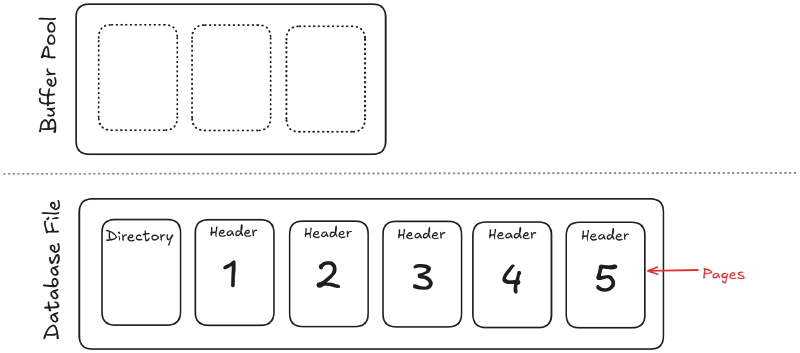
When a query needs a page:
- if the page is already in memory, access is fast;
- if not, the DBMS must fetch it from disk;
- if memory is full, another page may be evicted.
A lot of database performance comes down to page reuse and avoiding unnecessary disk I/O.
7. Disk pages and files#
Databases do not read and write one row at a time physically. They move data in blocks called pages.
A page is a fixed-size chunk of storage that may contain:
- table rows;
- index entries;
- metadata;
- free space information.
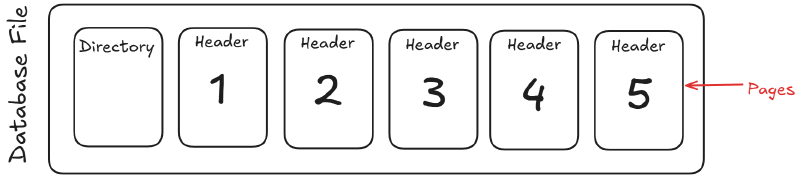
Working in pages is more efficient than managing each value separately.
Why memory hierarchy matters#
The farther data is from the CPU, the slower it usually is to access.
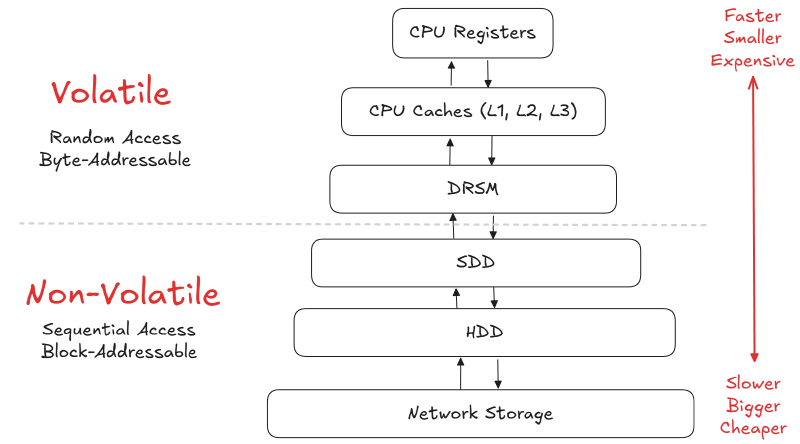
| Level | Memory type | Typical speed idea |
|---|---|---|
| CPU registers | On-chip memory | Fastest |
| CPU cache | Small hardware cache | Extremely fast |
| RAM | Main memory | Fast |
| SSD / NVMe | Persistent storage | Much slower |
| HDD | Spinning storage | Slower again |
| Distributed FS | Network-backed storage | Slowest here |
The buffer pool exists because reading from RAM is dramatically cheaper than repeatedly going to disk.
Sequential vs random access#
A DBMS prefers access patterns that minimize random disk reads.
- Sequential access reads nearby pages efficiently.
- Random access jumps around and costs more.
This is one reason clustering, page layout, and indexing decisions matter so much.
Transactions, locks, and recovery#
Beyond reading and writing data, a DBMS must keep it correct during concurrent activity and after failures.
Important components often include:
- a transaction manager;
- a lock manager or concurrency-control subsystem;
- a recovery manager;
- a write-ahead log.
These components help the system preserve consistency when many users write at once or when a crash happens during an update.
Example: how a simple query flows through the DBMS#
Take this query:
SELECT full_name
FROM users
WHERE email = 'alice@example.com';
A simplified flow looks like this:
- the client sends the SQL statement;
- the parser validates the syntax;
- the validator checks that
users,full_name, andemailexist; - the optimizer checks available indexes and statistics;
- the execution engine runs the chosen plan;
- the storage manager retrieves the needed index and table pages;
- the buffer pool serves pages from memory when possible;
- the result is returned to the client.
If there is an index on email, the optimizer may choose an index search instead of a full scan. That is exactly the kind of decision explored in SQL Index Performance.
Common mistakes when learning DBMS architecture#
Thinking SQL runs directly on files#
It does not. Many layers exist between the query you write and the bytes on disk.
Confusing the optimizer with the execution engine#
The optimizer chooses the plan; the execution engine runs it.
Ignoring memory#
A query can be logically correct and still perform badly because of poor page access patterns.
Treating indexes as separate from architecture#
Indexes are part of the architecture story because they change the work done by the optimizer, the execution engine, and the storage layer.
FAQ#
What are the main components of DBMS architecture?#
The usual components are the client interface, parser, query processor, optimizer, execution engine, storage manager, buffer manager, and recovery subsystem.
What is the role of the query processor in DBMS?#
It converts SQL into an internal representation the DBMS can optimize and execute.
What is the difference between storage manager and buffer manager?#
The storage manager organizes persistent data access; the buffer manager caches pages in RAM to reduce disk I/O.
Why is DBMS architecture important?#
Because it explains where performance, concurrency, durability, and query behavior really come from.
Next step#
Now that the architecture is clearer, study SQL Index Performance to see how one component of the system, the index, changes the optimizer’s choices and the engine’s work.